Landing pages live or die on trust. A visitor who arrives at a campaign page needs a reason to believe the business behind it is legitimate, capable, and worth their time. Social proof, in the form of customer testimonials and reviews, is one of the most effective signals that trust is well placed. Yet gathering that proof in a form ready for a campaign is harder than it sounds, and the shortcuts businesses take to fill the gap can cause more harm than good.
Why Landing Page Testimonials Are Difficult
The idea behind social proof is straightforward: when prospective customers see that others have had a positive experience with a business, they feel more confident about engaging with it themselves. Testimonials, star ratings, and customer quotations all serve this function. The problem is that collecting and formatting that evidence for each new campaign takes time and coordination. A small-business owner launching a seasonal promotion or a new service offering rarely has a polished set of testimonials ready to drop into a landing page on short notice.
Agencies face a version of the same challenge. When building campaign pages for clients, they often need to chase down approved quotes, wait for legal sign-off on customer names, or work around clients who simply cannot recall which customer said what. The result is that testimonial sections are frequently left blank, filled with placeholder copy, or, even worse, populated with invented content.
AI-generated customer names and fabricated quotations are misleading. Visitors who discover that testimonials are invented lose trust in the business entirely, and the reputational damage can far outweigh any conversion benefit the fake social proof was meant to deliver.
The irony is that most businesses with any history already have a body of genuine customer feedback sitting in plain sight: their Google reviews. These are public, attributable, and written by real people. Rather than inventing testimonials from scratch, the responsible path is to surface and reuse what customers have already said, with appropriate credit and with the business owner's awareness. That is exactly the problem DayClerk's latest capability is designed to solve.
Introducing Client-Approved Google Reviews
DayClerk now includes a step during client onboarding that identifies the client's Google business profile and, with the client's explicit approval, connects their existing public reviews to their brand profile. The process is designed to be transparent at every stage, so that no review is ever used without the business owner knowing about it.
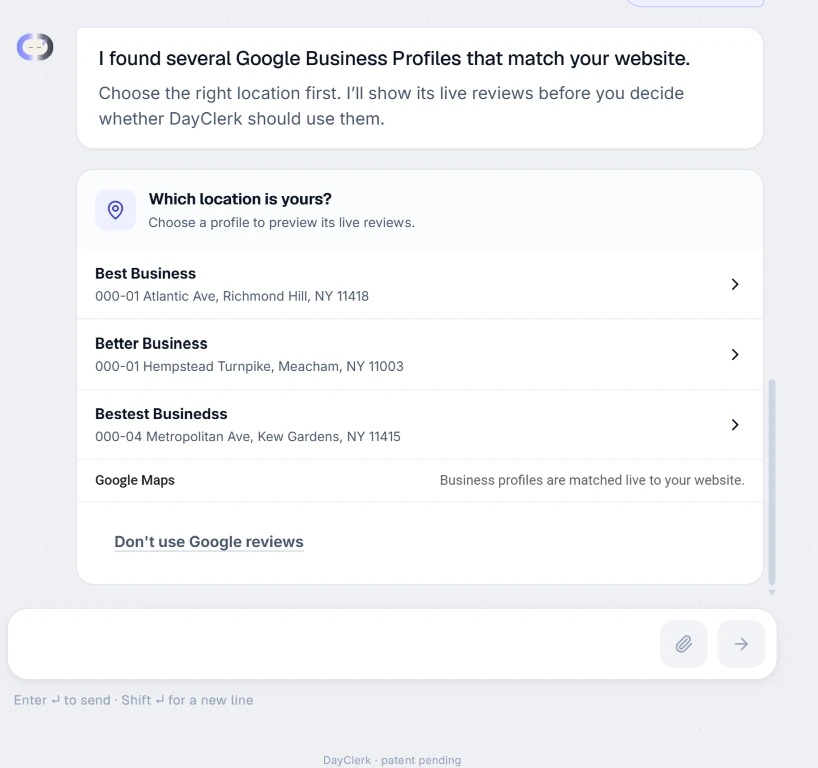
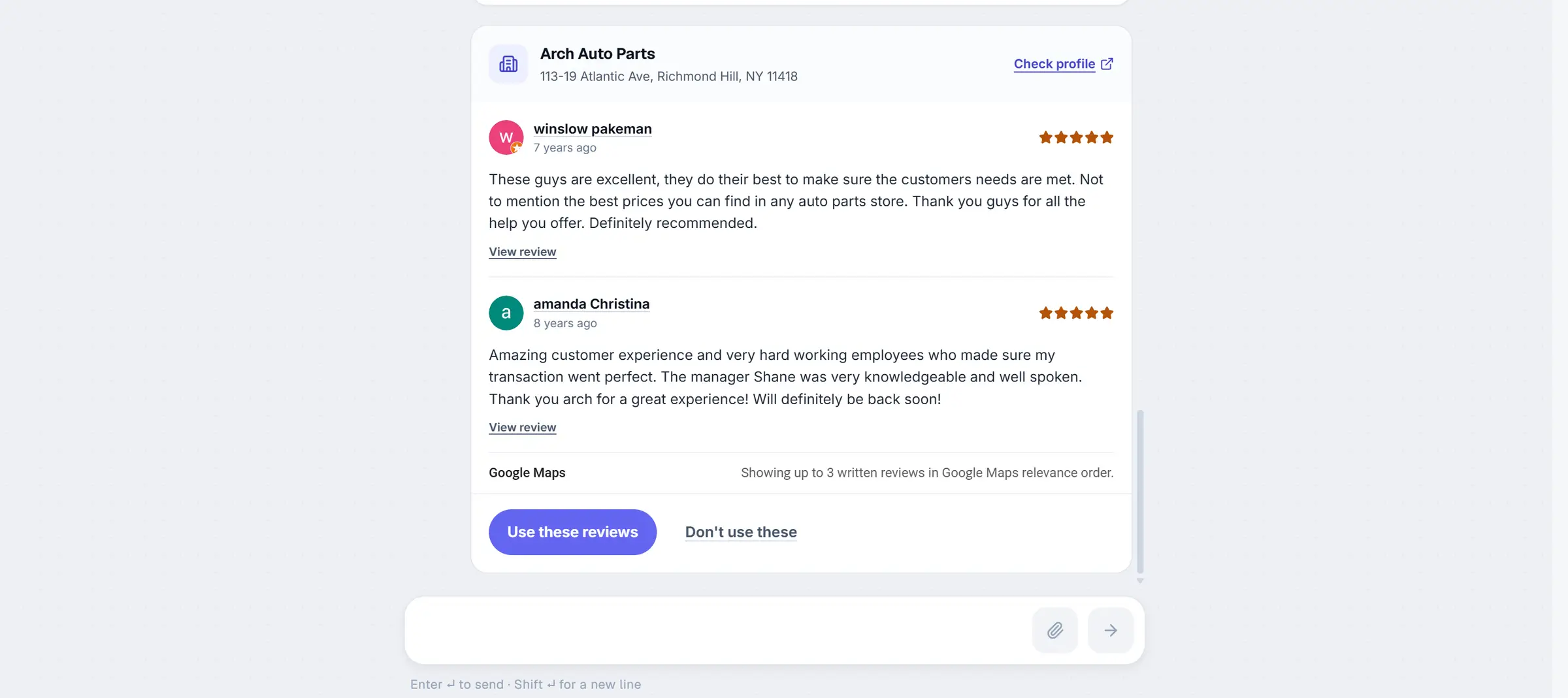
Once a location is identified, DayClerk shows the client a preview of the reviews associated with that profile. The client can read through what real customers have written before any decision is made. Only after the client selects "Use these reviews" are those reviews connected to the brand profile. If the client prefers not to use their Google reviews at all, for any reason, they can decline during onboarding and continue without interruption. The choice is theirs, and declining has no effect on the rest of the setup process.
Reviews are connected only after the client actively selects them. No review appears in a campaign without the business owner's knowledge and consent.
How Reviews Enter a Campaign
Once a client has approved their Google review source, that approval is stored as part of their brand profile in DayClerk. From that point forward, whenever DayClerk generates a campaign for that client, it knows where to look for social proof. The reviews do not need to be re-approved for each new campaign; the brand profile carries the association forward automatically.
When DayClerk builds a landing page and determines that a review carousel section is appropriate for the campaign, it connects the live review source automatically. The carousel populates with real reviews drawn from the approved Google business profile. There is no step where a copywriter, agency team member, or AI model fills in customer names or writes quotations on a customer's behalf. What appears on the page is what customers actually wrote.
Designed to Preserve the Campaign
Adding a new data source to a campaign page carries a real risk: the new element disrupts the visual design that was carefully assembled around the rest of the content. DayClerk addresses this by routing Google reviews through its existing carousel module rather than introducing a separate component that would need its own styling rules.
Brand colors, typography, spacing, quote styling, and carousel navigation all remain exactly as they were established for the campaign. The reviews slot into the design rather than overriding it. Google attribution acknowledges that the reviews come from Google Maps, and it is added in a compact form that sits within the existing layout without dominating it or displacing other design elements.
The carousel can display up to three written reviews, presented in Google Maps relevance order. That ordering is determined by Google, not by DayClerk, and reviews are not filtered or re-sorted by star rating. The carousel shows the reviews Google considers most relevant for the location, which typically reflects a combination of recency, helpfulness, and engagement.
Google reviews slot into the campaign's existing design rather than overriding it; brand colors, typography, and spacing remain exactly as established.
Client Control Remains Central
At every point in the process, control stays with the business owner. The Google business location must be actively confirmed before any connection is made. Reviews are shown to the client before approval is requested, so there are no surprises about what content might appear in a campaign. If the client decides during onboarding that they would rather not use Google reviews, they can decline and move on without losing any other functionality.
Beyond onboarding, editors working in DayClerk retain the ability to switch the social proof section of any campaign page to custom testimonials when that is the better fit. If a client has collected written testimonials through another channel, or if a particular campaign calls for a more curated selection of quotes, the editor can make that choice without being locked into the Google review integration. The integration is an option, not a constraint.
Build Campaigns With Social Proof Your Customers Can Verify
The testimonials that do the most work on a landing page are not the most polished ones; they are the ones visitors can trust. A quotation from a real customer, attached to a real name and sourced from a public platform visitors can check for themselves, carries more weight than any amount of carefully crafted marketing copy. DayClerk's Google Reviews integration exists to make that kind of verifiable social proof accessible without requiring a business to start from scratch each time a new campaign is built.
Set up your DayClerk brand profile, approve your business reviews during onboarding, and create landing pages grounded in real customer experiences. The reviews your customers have already left are ready to work harder for your business.